Custody, child expenses and messages, kept fair for both parents
FairShare Parents gives you and your co-parent one custody calendar, a shared expense tracker with receipts and approvals, and a message thread nobody can edit. When a lawyer or mediator asks, export a clean family record in one tap.
The demo uses a sample family. No account, nothing to install.
TodayMaya & Leo are with youWith you until Fri, 5:00 PM
SMTWTFSSMTWTFS
YouJordanHandover
Swap request Maya with Jordan, Nov 10 to 11
ApproveDecline
The Home screen: who has the kids now, when they come back, and the next two weeks as one ribbon.
Everything co-parents use every week, in one calm place
Custody schedule app
A co-parenting calendar you can both trust
Set your base custody schedule and handover time once. Both parents see the same days, and swaps only change the calendar when the other parent says yes.
Week on/week off, 2-2-3, 2-2-5-5 or every other weekend
Handovers with time and direction (“you to Jordan”)
The next two weeks as one ribbon
Shared custody expense tracker
Split child expenses without the back-and-forth
Snap the receipt and choose the split. Your co-parent approves or rejects it with a reason, and the balance only counts what you both agreed to.
Receipt photo kept with every expense
50/50 or any percentage split
Who owes whom, from approved expenses only
Co-parent communication app
Co-parent communication that stays on the record
One thread for the two of you. Messages can’t be edited or deleted, and every one is timestamped in your family’s time zone.
Permanent, timestamped messages
Calm, neutral design for both parents
Included in the family record
For lawyers and mediators
A court-ready family record in one tap
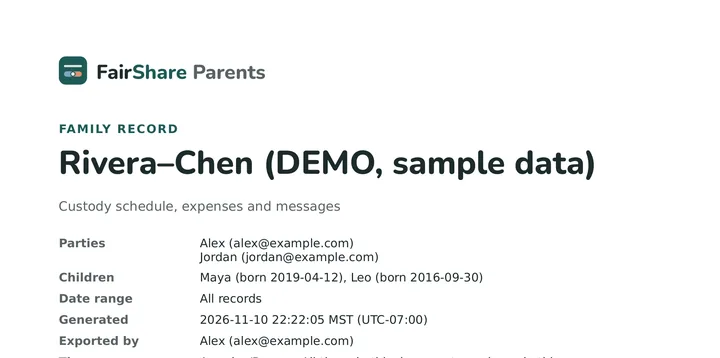
Export the custody schedule with every request and answer, all expenses with totals, and the full message history as one clean PDF.
Parties, children, date range and time zone on the cover
Export ID and SHA-256 fingerprint
Page numbers and plain tables
How it works
Create your family
Add your name, your kids and the custody schedule you already follow.
Invite your co-parent
They join with their email. The calendar fills in as soon as they accept.
Run the week from one place
Handovers, swap requests, receipts and messages, with both of you seeing the same thing.
Wherever you live
Works in any country, time zone and currency
Pick your family’s time zone, currency and date format when you set up. Both parents then see the same times and amounts, even if one of you moves or travels. Amounts can be in US, Canadian, Australian or New Zealand dollars, pounds or euros.
Use it alongside your parenting plan, custody order or separation agreement. The base schedule mirrors your parenting time, and the family record gives your lawyer or mediator the facts in one document. FairShare Parents is not legal advice.
Comparing apps?
A simpler OurFamilyWizard alternative
If you’re looking for an OurFamilyWizard alternative, FairShare Parents focuses on the everyday three: the custody calendar, shared child expenses and co-parent messages. One family plan covers both parents, and the design stays calm and neutral so neither parent feels the app takes sides.
Frequently asked questions
What is a co-parenting app?
A co-parenting app gives separated or divorced parents one shared place for the custody schedule, child expenses and messages, so nothing depends on memory, screenshots or long text threads. FairShare Parents keeps all three together and both parents see the same thing.
Can my co-parent and I share one custody calendar?
Yes. You set a base custody schedule once (week on/week off, 2-2-3, 2-2-5-5 or every other weekend, with your handover time), and both parents see it. Swaps and holidays are requests: they only change the calendar after the other parent approves.
How do we split child expenses?
Add an expense with a photo of the receipt and choose the split (50/50 or another percentage). Your co-parent approves it or rejects it with a reason, and the balance shows who owes whom from approved expenses only.
Can messages be edited or deleted?
No. Messages in FairShare Parents are permanent and timestamped, so both parents can trust the history. That also keeps conversations calmer.
Can I use the record with a lawyer, mediator or in court?
You can export a family record PDF with the custody schedule and request history, expenses with totals and the full message history. It shows the parties, the date range, the time zone, when it was generated, page numbers and a SHA-256 fingerprint so a copy can be checked. Whether a court accepts it is up to the court; ask your lawyer.
Is FairShare Parents an OurFamilyWizard alternative?
Yes, if you want something simpler. FairShare Parents focuses on the three things co-parents use every week: the custody calendar, shared expenses and messages. One family plan covers both parents. FairShare Parents is not affiliated with OurFamilyWizard.
Does it work in my country?
Yes. FairShare Parents works anywhere: each family picks its time zone, currency (US, Canadian, Australian or New Zealand dollars, pounds or euros) and date format, and both parents see the same times and amounts. It works alongside a parenting plan, custody order or separation agreement wherever you live. It is not legal advice.
Can I try it before signing up?
Yes. The live demo uses a sample family, needs no account and lets you play both parents.
See it with a sample family in 30 seconds
Play both parents, propose a swap, add a receipt and download the family record.